WiFi Registration (Platform Registration)
By registering the door lock on the SOMA App, you can access various IoT services, including:
- Issuing Zigbang Digital Keys
- Remote Door Unlocking
- Entry History Notifications
How to Register the Door Lock:
- Install the SOMA App:
- Download the “SOMA” App from the Google Play Store or App Store.
- Create an Account / Log In:
- Open the app and sign up or log in with your account credentials.
- Add a Device:
- Go to the Device Registration menu and select “Digital Door Lock”.
- Activate WiFi Pairing Mode on the Door Lock:
- Follow the product manual to enter Administrator Mode on the door lock.
- Select WiFi Settings and activate Pairing Mode.
- Complete Registration:
- Follow the app’s prompts to connect the door lock to your home WiFi network.
- After successful registration, save the settings and name the device.
Welcome Feature (APP Setting Function)
When the user approaches the door lock, the doorbell LED lights up, and the key tag reader or fingerprint scanner is automatically activated, entering Authentication Standby Mode. By default, the Welcome Feature is enabled after purchase.
- Detection Range Adjustment: The detection range has three adjustable levels and can also be disabled via the app.
Door Closing Time Setting (APP Setting Function)
This function allows users to set the automatic door closing time. If the deadbolt gets stuck due to environmental conditions, adjust the door-closing time to prevent locking malfunctions.
Sound Volume Setting for Operation Tones
In addition to adjusting the voice guide volume, the melody sound that plays when the door lock opens or closes can also be adjusted.
- Sound Settings: Mute, Medium, High – configurable via the app.
Indoor Multi-Touch (Door Unlocking) Mode (APP Setting Function)
The default unlocking method is touching the front of the indoor handle. However, in environments where accidental unlocking could be an issue, users can enable Multi-Touch Mode, which requires touching both the front and side surfaces of the indoor handle simultaneously.
- Purpose:
- Prevent pets from accidentally unlocking the door.
- Reduce unlocking caused by human errors or picking attempts.
Home Security Mode (Stay Safe Function)
This feature restricts door unlocking from outside, ensuring maximum privacy when everyone is at home during the night or at other times. Once enabled, no authentication method will unlock the door from outside.
- Important Caution:
- After enabling this feature, the door cannot be opened from outside, even with registered methods.
- Prevent Unauthorized Use: Ensure children do not activate this setting from inside.
- App Use Warning: Do not enable this function when no one is home.
Setting Mode
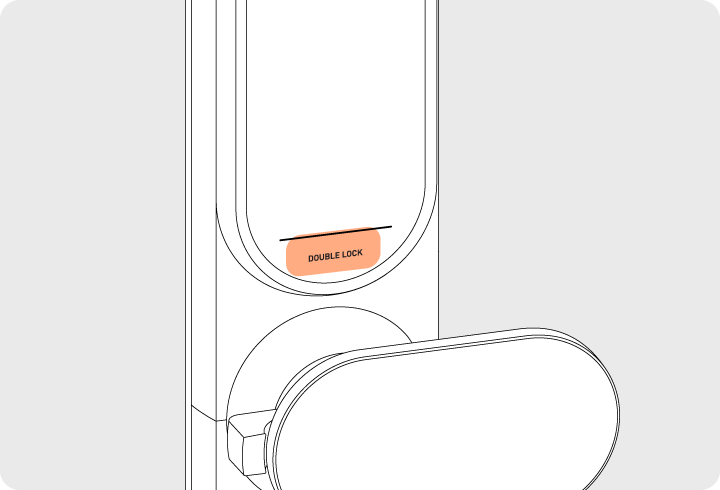
Press and hold the [DOUBLE LOCK] button on the indoor unit for 3 seconds while the door is locked.
Deactivation
- Press the [DOUBLE LOCK] Button:
- Briefly press the [DOUBLE LOCK] button on the indoor unit to deactivate the lock.
- Manual Release:
- Turn the manual release lever downward to unlock and open the door.
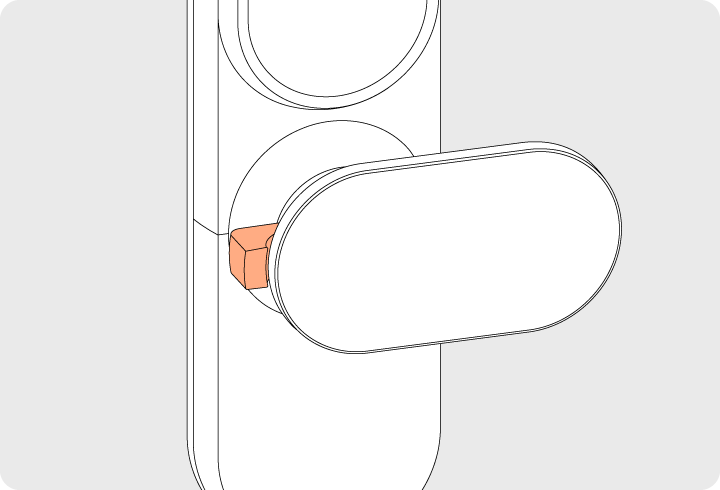
- Turn the manual release lever downward to unlock and open the door.
Tamper Prevention Feature (Default - Cannot Be Disabled)
This feature prevents unauthorized access by blocking the door lock’s operation when incorrect authentication attempts are made:
- If an unregistered fingerprint or key tag is used, the door lock will emit an error sound followed by a 3-minute lockout period with a voice notification.
- During this time, all door lock functions, including face recognition, will be disabled for 3 minutes for each failed authentication attempt.
Intrusion Detection Feature (Default - Cannot Be Disabled)
This feature triggers a warning alarm when the door is forcibly opened from the inside or outside:
- If the door is forcefully opened while locked, the door opening sensor will detect the intrusion and sound an alarm for 5 minutes.
- Deactivating the Alarm:
- Authenticate using an outdoor authentication method (e.g., passcode, fingerprint, face recognition).
- Use the mobile app to disable the alarm remotely.
High-Temperature Alarm Feature (Default - Cannot Be Disabled)
This feature activates when the indoor temperature rises abnormally (around 70℃ ± 10℃):
- The temperature sensor will detect the high temperature and trigger the alarm.
- What to Do:
- Wait for the alarm sound to stop.
- Use the manual release lever to unlock the door and exit the premises.
- The door lock will resume normal operation once the indoor temperature returns to a safe level.