Battery Replacement
When the battery replacement melody and voice notification sound while opening the door, replace the batteries immediately. Continuing to use the door lock without replacing the batteries may cause it to stop functioning.
How to Replace the Batteries:
- Open the Battery Cover:
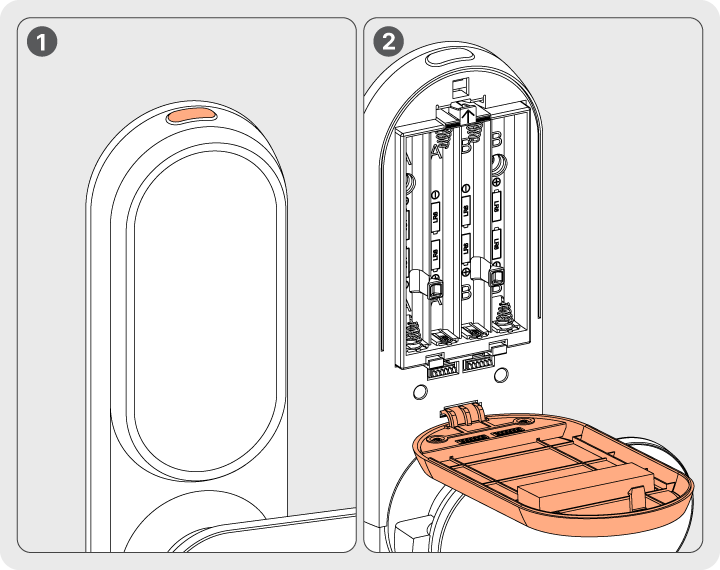
- Press the top cover button on the indoor unit to unlock and open the battery compartment cover.
- Remove Old Batteries:
- Carefully take out the used batteries.
- Insert New Batteries:
- Insert 8 AA alkaline batteries (1.5V).
- Ensure correct polarity (+/-) as indicated in the compartment.
- Close the Battery Cover:
- Securely close the cover after installation.
Emergency Door Unlocking Method
If the batteries run out due to delayed replacement, the door lock may fail to operate properly. In this case, follow these steps to unlock the door using emergency power supply:
- Open the Emergency Power Terminal Cover:
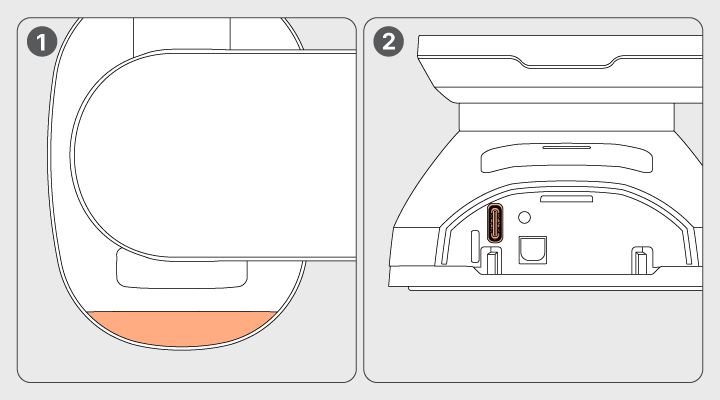
- Locate the emergency power terminal cover at the bottom of the outdoor unit and open it.
- Connect a Power Bank:
- Plug a USB-C cable from a portable power bank into the terminal.
- Ensure the power bank is fully charged.
- Unlock the Door:
- Once power is supplied, enter your passcode, scan your fingerprint, use a key tag, or perform face recognition to unlock the door.
- Replace Batteries Immediately:
- After successfully unlocking the door, replace all batteries with new AA alkaline batteries (1.5V) as soon as possible.
Important Notes:
- Ensure the power bank is fully charged before use.
- Disconnect the USB-C cable after the door is unlocked to prevent power drainage.
- Test the lock after replacing the batteries to ensure normal operation.